



What Is Blob Opera?
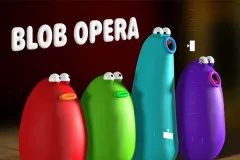
Blob Opera is a creative online music game developed by David Li in collaboration with Google Arts & Culture. This game uses machine learning trained on real opera singers to help players create impressive operatic harmonies with zero musical experience.
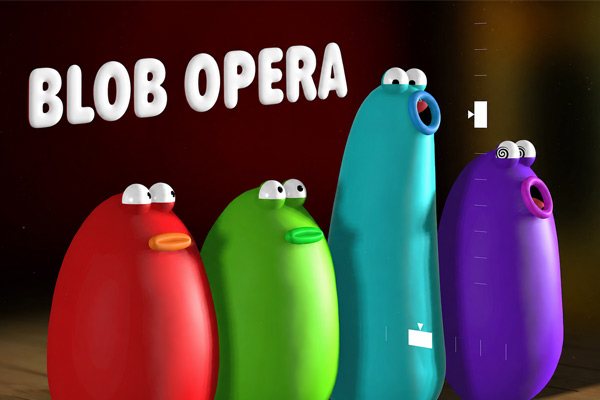
The game has four colorful blobs (soprano, tenor, bass, and mezzo-soprano voices) representing the different voices of an opera. Their sounds are recorded from professional singers Christian Joel, Frederick Tong, Joanna Gamble and Olivia Doutney, where the music is realistic and expressive.
Gameplay Breakdown
Playing Blob Opera is simple and entertaining. Drag a blob upward or downward to change its pitch, then move it side to side to alter vowel sounds. The other blobs automatically harmonize with your actions in real time, creating smooth and dynamic opera music.
Players can experiment freely without rules, scores, or time limits. You can also select performance stages inspired by cities like London, New York, and Mexico City to give your musical performance a different atmosphere. Once satisfied with your creation, use the record button to save and share your opera with friends.
Game Controls
- Left Mouse Button: Click and drag blobs
- Up / Down Movement: Change musical pitch
- Side-to-Side Movement: Adjust vowel sounds
- Record Button: Save and share performances
Key Features of Blob Opera
Real Opera Voices Powered by AI
Blob Opera uses machine learning trained on real opera vocals, making every note sound rich and authentic while remaining fun and accessible.
No Musical Skills Required
Anyone can create beautiful harmonies instantly, whether they are music lovers, casual players, or complete beginners.
Endless Creative Freedom
There are no strict objectives or limitations. Players can experiment with melodies, recreate famous themes, or simply enjoy funny vocal combinations.
Browser-Based Gameplay
Blob Opera runs smoothly on desktop and mobile web browsers, making it easy to play anywhere without downloads.
Tips for Newbie
Start by controlling one blob to understand how pitch and vowel sounds work together. After that, combine multiple blobs to create richer harmonies. Slow movements often produce smoother opera sounds, while dramatic upward drags create powerful high notes. Don’t forget to record your best performances and experiment with festive mode for extra fun.